Current Day Print Viewer
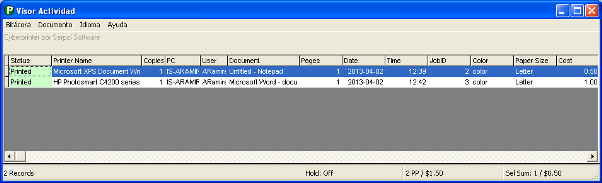
Instructions
To access the activity viewer, follow these steps:
- Right-click on the Cyberprinter icon (green circle with the “P”).
- Select the Log Viewer option.
The printed totals are displayed in the status bar located at the bottom of the screen. Four fields are shown:
Total Records:
This is the total number of displayed records. If the retention mode is enabled, this count will include both printed documents and retained documents.
Operation Mode Status:
If Cyberprinter Server is installed on Windows 2000, Windows XP, Windows 2003, Windows 2008, or Windows 7, the retention mode will be available. This mode allows you to retain any document before it is actually printed. To configure this mode, go to Options in the settings menu.
Printed Pages Count:
When a document is actually printed, the cell in the first column will turn green. Only printed pages are counted here; retained pages are not counted (in retention mode).
Sum of Selected Records:
You need to select some records to perform operations such as printing or canceling them. You can also count the number of pages simply by selecting records, regardless of whether the selected records are printed or retained.