Send Print Summary by Email
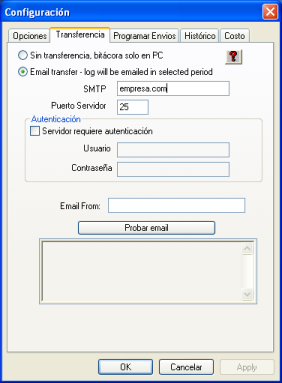
You can configure Cyberprinter to send the operation log to your email inbox, allowing you to receive a summary of the daily activity automatically.
To configure log delivery to your email, you only need to specify your email address. You must also provide an SMTP address, which you can obtain from your internet provider or your network administrator.
Test Email Button:
This button allows you to check whether the configuration is correct. It provides a diagnostic of the connection and the mail server’s response, as well as sending a test email.
An example of a successful session looks like this:
(The sequence of events is shown from bottom to top)
Email Test successfully sent.
250 2.0.0 i440i5Ko028261 Message accepted for delivery
354 Enter mail, end with “.” on a line by itself
DATA
250 2.0.0 Reset state
RSET
250 HELP
250-DELIVERBY
250-ETRN
250-DSN
250-SIZE
250-8BITMIME
250-ENHANCEDSTATUSCODES
250-mail.gem.com.mx Hello dialup467.gem.net [201.130.7.211], pleased to meet you
EHLO vaio
220 mail.gem.com.mx ESMTP Sendmail 8.12.8/8.12.8; Mon, 3 May 2004 19:44:05 -0500
Connected.
Connecting to mail server.